Dave’s Hot Chicken Secret Menu and TikTok Hacks
Some viral orders are ordinary add-ons. One former fan creation became an official item. Check the actual build before using a nickname.
A video can make a custom Dave’s order look like a hidden product that every employee knows. Usually the useful question is simpler: what food was ordered, what was added and what did it cost? A nickname alone does not establish an official item or a free modification.
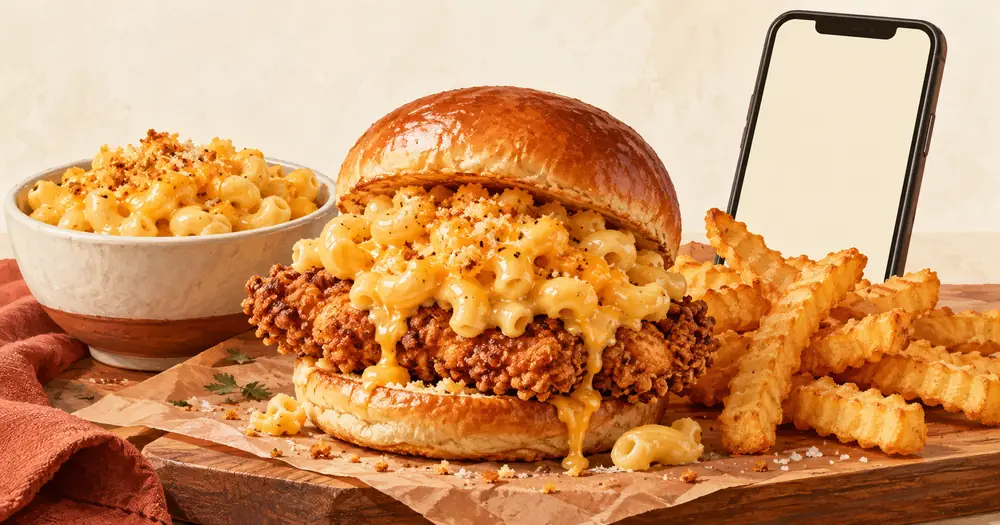
Dave’s documented one real path from fan creation to official product. Its August 28, 2026 announcement described the mac-topped slider formerly called “The Big Shot” and introduced the limited-time Mac-Loaded Slider. Other secret-menu claims still need to be checked against the selected restaurant’s menu.
The strongest confirmed example is the Mac-Loaded Slider
The brand’s Mac-Loaded Slider announcement says guests had been adding mac and cheese to a chicken slider. It identifies The Big Shot as the earlier fan name and connects that combination with social-media interest.
The company then made a Mac-Loaded Slider an official limited-time menu item. That matters when reading older lists. A page may still call the combination secret even though a named version is now sold through regular ordering.
The announcement described an additional $2 at launch. That is a dated promotion detail, not a promise about every current local order or delivery total. Our Mac-Loaded Slider guide explains the serving and the separate fries question.
Ask for the current listed item if it appears at your restaurant. If it does not, asking whether a slider and a side of mac can be ordered separately is clearer than expecting a staff member to recognize an old nickname.
Separate three very different kinds of viral order
| What a video shows | What it may actually be | What to check |
|---|---|---|
| A named special in the ordering menu | An official product | Availability and included sides |
| A slider with another item added | A paid custom order | Whether staff can make it and the extra cost |
| Food mixed after pickup | A customer-assembled meal | The separate items needed |
Those distinctions prevent a frustrating counter conversation. A restaurant may sell all the ingredients shown in a video without offering the finished combination as a single item.
They also change the price comparison. Buying a slider plus a full side for a few spoonfuls of topping is different from buying a listed slider with a built-in topping. Compare the checkout totals for the amount of food you actually want.
Turn a TikTok clip into a usable order
Pause the video before the food is mixed. Write down the base product, quantity, heat choice and every extra. Then check whether the creator ordered through the restaurant app, at the counter or through delivery.
- Find the base item at your selected restaurant.
- Match its size. A Mini Slider, regular Slider and XL Slider are different starting points.
- Check which extras appear as actual choices.
- Ask about an unlisted change before paying.
- Review the receipt or cart for every charged add-on.
The official location-menu page is an example of how named specials and ordinary meals appear in ordering. Select your own branch before relying on its availability or prices. A menu from another city is not confirmation for your restaurant.
For available bread, slaw, pickle and sauce changes, use the custom-order guide. This article focuses on evaluating viral claims. It does not create a second hidden ordering system.
Adding mac or sauce yourself can be a practical choice
If you want to try a combination without changing the whole meal, order the components you want and combine a small amount after pickup. Keep the rest separate until you know whether the texture suits you.
Wet toppings can soften a crisp coating or make a bun harder to handle. For takeout, leaving a topping in its own container until you eat can give you more control. That is a serving suggestion, not a promise about the restaurant’s packaging or a claim that staff must provide extra containers.
Check whether fries already come with the base order before buying another portion. The extras and add-ons guide helps distinguish included components from separate purchases.
Claims that deserve an extra check
- “It is always free.” Look for the extra in the cart and ask about any charge.
- “Every store knows the name.” Explain the ingredients instead.
- “This code works everywhere.” Check current offer terms and the selected ordering channel.
- “It is a permanent item.” Confirm whether the official listing calls it limited-time.
- “This is a new heat level.” Check the real heat options instead of inventing an off-menu setting.
A highly viewed clip does not establish any of those claims. Likewise, a creator’s final total may reflect another market, an older price or a personal app offer. Treat the clip as an idea until you can rebuild the order in your own cart.
Customizing a meal does not settle dietary questions
Removing a topping can change the listed build. It does not prove that all ingredients or preparation conditions meet a dietary need. An added dip can also change what needs checking.
Use Dave’s official allergen information for the current components and speak with the restaurant about preparation if an allergy is involved. The cross-contact guide explains questions that a social-media recipe cannot answer.
The most useful secret-menu trick is a clear ingredient list. Start with the Dave’s Hot Chicken menu, look for a named version and check the full cost before adding extras. If a video’s nickname is unfamiliar, a plain request for the actual food gives staff a much better chance to help.


