
Dave’s Hot Chicken Spice Levels: All 7 Explained
From No Spice to Reaper, see what each heat choice means and how to pick one that suits your order.
Ordering a tender or slider at Dave’s means making one more choice: how hot should the chicken be? You can pick something gentle or go to the far end of the scale. The names help, but they do not tell you exactly how your mouth will react to the seasoning.
Dave’s official ordering menus list seven heat choices: No Spice / Not Hot, Lite Mild, Mild, Medium, Hot, Extra Hot and Reaper. Reaper carries a special warning. If you’re new to the restaurant, a lower level is a practical place to start.
The seven Dave’s spice levels compared
Dave’s lists the heat levels in the same order on its official Single Slider page and on other menu items. The table below is an easy way to decide what to order. Its descriptions are practical guidance rather than official measurements of heat.
| Heat choice | What to expect | Who might choose it? |
|---|---|---|
| No Spice / Not Hot | The lowest heat selection. | Anyone who wants to focus on chicken and toppings without added heat. |
| Lite Mild | A very gentle introduction to spice. | A first-time visitor who wants a little seasoning heat. |
| Mild | A step above Lite Mild. | Someone who usually enjoys lightly spicy food. |
| Medium | The middle of the named scale. | Someone comfortable with more noticeable spice. |
| Hot | A stronger choice. | Someone who orders spicy food regularly. |
| Extra Hot | Near the highest end. | Someone already comfortable with intense chili heat. |
| Reaper | The extreme choice with a restaurant warning. | Only diners who understand the warning and genuinely want that experience. |
These descriptions are not exact heat promises. A person who usually enjoys strong hot sauce may find Medium comfortable. Someone who rarely eats chili may feel differently. The order of the names is the useful part. There is no verified restaurant-wide Scoville number for each prepared item in the official pages checked for this article.
Which spice level should you order first?
Think about the foods you already enjoy. If ordinary hot sauce feels too strong, choose No Spice or Lite Mild. If you sometimes eat spicy wings or chili, Mild or Medium may be a comfortable starting point. You can try another level on a future visit once you have your own point of comparison.
Food format matters too. A slider comes with a potato bun, kale slaw, pickles and a drizzle of Dave’s Sauce. A tender is served with sliced bread, pickles and sauce on the side. Those toppings affect how the meal tastes. They do not turn an Extra Hot tender into a Mild one. Compare the main meals and their price examples before choosing your seasoning.
Start with the meal you’ll enjoy
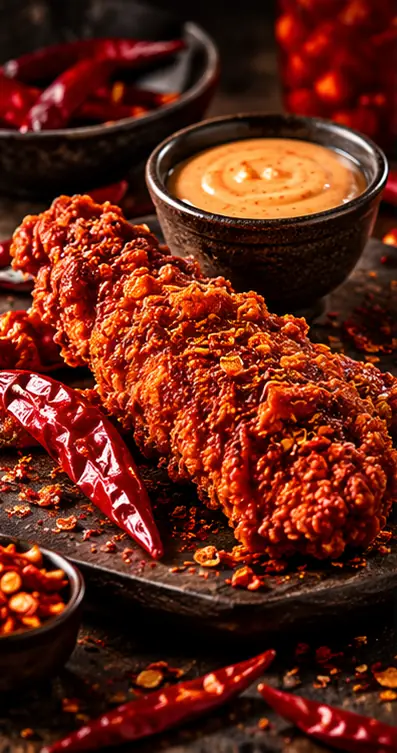
A slider and a tender give you different ways to eat the same style of chicken. Choose the food first. Then pick the heat. This is illustrative photography, not an official product picture.
Can two tenders or sliders have different spice levels?
Yes, on some official ordering screens. A Dave’s #1 meal shows a separate heat choice for the first and second tender. The two-slider bundle also lists separate selections for its sliders. This is useful if two people have different heat preferences or you want to compare nearby levels.
Check the specific product instead of assuming every bundle works this way. Minis, bites, cauliflower items and limited-time meals can have their own choices. Some menu screens offer individual controls while others use one heat level for the group. Read the choices one by one before you finish checkout.
What makes Reaper different?
Reaper is the last and most extreme choice in the named scale. The official tender and slider screens label it with a disclaimer. Read that warning before ordering. Very strong pepper heat can be deeply uncomfortable. You do not need to try it to get the signature hot chicken experience.
Do not order a Reaper piece for someone else as a joke or hide it in a shared meal. That is especially important for group boxes and roulette-style orders. If you have a health concern that could make extreme spice risky, skip the challenge and seek appropriate medical guidance when needed. A good meal matters more than testing a limit.
Spice on the chicken vs. sauce on the side
The heat level you select for the chicken is not the same as choosing an extra dip. Dave’s also lists items such as Dave’s Sauce, Dave’s Ranch and Reaper Ranch on some menus. These are separate choices. Someone ordering a No Spice tender might still add a sauce with more heat.
If you’re ordering for children or anyone who dislikes strong spice, inspect both the chicken selection and the added sauces. Ask for a sauce on the side where the store offers that option. Changes to a sauce do not automatically change the seasoning on the chicken. Our allergen guide also explains why removing sauce or bread does not, by itself, make food allergy-safe.
Are there official Scoville numbers for each level?
You may see charts online that assign precise Scoville Heat Units to all seven choices. Those charts can look scientific. But a prepared fried chicken item is not simply one whole chili pepper. Heat depends on how a coating is made, how much of it is present and the person eating it.
The official ordering pages we checked identify the seven choices and the Reaper warning. They do not publish a verified laboratory value for each completed tender or slider. Until a reliable source does, it’s better to explain the ordering scale than to invent a set of numbers.
A simple checklist before you pay
Most ordering mistakes happen when someone picks the right meal but forgets the details. Confirm the item, the heat level for every piece and any extra sauces. For a shared meal, ask each person what they would actually enjoy. Recheck the order if you change from tenders to sliders because the screen may offer different modifiers.
Also check the restaurant location. Menus, stock and special offers can differ. The official Dave’s location finder helps you find the store you plan to use. For calories or allergy concerns, refer to its current nutrition and allergen documents instead of guessing from the heat name.
- Choose the chicken item or combo you actually want.
- Select the heat for each piece when the menu provides separate choices.
- Check sauces, add-ons and any Reaper notice.
- Confirm the store and your final order before paying.
One helpful reminder: No Spice changes the heat selection. It does not remove breading, buns or any allergens. If your order involves an allergy or medical diet, confirm ingredients and kitchen practices directly with your restaurant.
The bottom line
You don’t need to choose the hottest level to enjoy Dave’s. The seven names give you a useful order from gentle to extreme, but your own tolerance determines what feels right. Start with a level you can enjoy through a whole meal, not just a single bite. Save Reaper for people who understand the restaurant’s warning.
If you still haven’t chosen your food, start with our Dave’s Hot Chicken menu and prices. It shows the meals, sides and drinks in one place. Once you’ve picked a tender or slider, come back to the heat table above.


